




Inconsistent CBTO Readings? How to Calibrate Your Bullet Comparator (2026)
Inconsistent CBTO Readings? How to Calibrate Your Bullet Comparator (2026)
You sit down at the reloading bench, measure five rounds from the same batch, and get five different CBTO numbers — 2.248, 2.251, 2.246, 2.253, 2.249. That is a 0.007-inch spread on cartridges that should be identical. Before you blame the bullet comparator, the bullets, or your sanity, know this: inconsistent CBTO readings are almost always caused by one of four fixable problems. This guide walks you through every cause, gives you a systematic diagnostic process, and shows you how to calibrate your comparator setup for readings that repeat within 0.001 inches.
Key Takeaway: Inconsistent CBTO measurements typically stem from dirty comparator inserts, inconsistent hand pressure on the caliper, worn or sticky caliper mechanisms, or actual bullet seating variation. A proper diagnostic starts with cleaning the insert bore with a cotton swab and solvent, then measuring a single cartridge ten times to isolate technique error from actual cartridge variation. If your single-cartridge spread exceeds 0.002 inches, the problem is your measurement process — not your ammunition. Calibrating your comparator takes under five minutes: zero the caliper with the insert installed, verify against a known standard, and establish your personal measurement protocol for consistent hand pressure and cartridge orientation.


The tool for this job
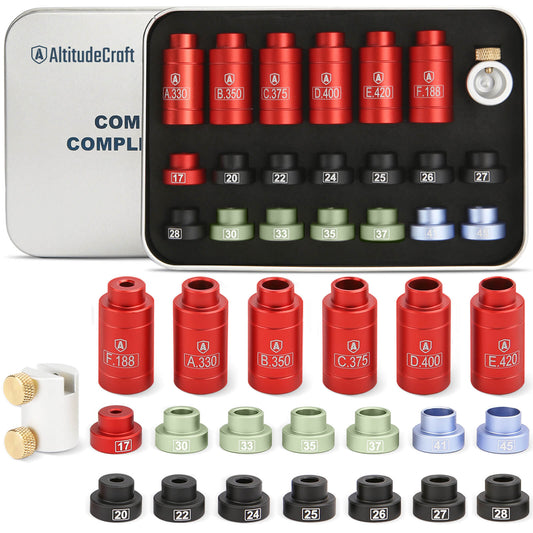
AltitudeCraft Bullet and Headspace Gauge Comparator Kit with 14 Inserts and 6 Bushings
$49.99
Free shipping & free returns on US orders $25+
View productUnderstanding What CBTO Actually Measures
Cartridge base-to-ogive length (CBTO) measures the distance from the base of the cartridge case to the point on the bullet's ogive where it contacts the comparator insert's bore. This contact point is at a specific diameter — typically the caliber's bore diameter. Unlike overall length (COAL), which measures to the often-inconsistent bullet tip, CBTO measures to the functional part of the bullet that engages the rifling. That is why CBTO is the measurement that directly correlates with seating depth and accuracy.
For a complete introduction to CBTO measurement technique, see our detailed guide to using a bullet comparator for precision reloading.
Ready to upgrade your toolbox?
See the Bullet Comparator KitThe 4 Root Causes of Inconsistent CBTO Readings
Before you start troubleshooting randomly, understand that CBTO measurement errors fall into exactly four categories. Identifying which category your problem falls into saves hours of frustration.
| Root Cause | Typical Spread | Diagnostic Test | Fix Difficulty |
|---|---|---|---|
| 1. Dirty insert bore | 0.002–0.008" | Clean insert, re-measure same round 10x | Easy (2 min) |
| 2. Inconsistent hand pressure | 0.001–0.005" | Measure same round 10x, note spread | Easy (practice) |
| 3. Worn or sticky caliper | 0.001–0.010" | Check caliper alone with gauge blocks | Medium (may need replacement) |
| 4. Actual seating variation | 0.001–0.003" | Measure same round 10x — if spread is <0.001", seating is the issue | Die adjustment needed |
Step-by-Step Diagnostic Process
Follow these steps in order. Each step either identifies or eliminates a root cause. Do not skip ahead — the sequence matters because later steps assume earlier causes have been ruled out.
Step 1: Clean the Comparator Insert
This is the single most common cause of inconsistent readings, and the easiest to fix. Bullet jacket material, case lube residue, and carbon deposits build up inside the comparator insert bore over time. Even a thin film of copper fouling changes where the ogive contacts the insert, producing different readings on the same cartridge.
How to clean:
- Remove the insert from the comparator body
- Wrap a cotton swab with a small patch of cleaning cloth
- Apply a few drops of Hoppe's No. 9 or similar solvent
- Push the swab through the insert bore 5–6 times, rotating as you go
- Follow with a dry swab to remove all solvent residue
- Inspect the bore under bright light — it should look uniformly smooth with no visible deposits
- Reinstall the insert and re-measure
How often to clean: Every 50–100 measurements, or immediately if you notice readings drifting.

Step 2: The Single-Cartridge Repeatability Test
This test isolates your measurement technique from actual cartridge variation. It is the most important diagnostic step.
- Select one cartridge from your batch — mark it with a Sharpie so you can identify it
- Measure its CBTO and record the number
- Remove the cartridge completely from the caliper
- Close the caliper jaws and re-zero if needed
- Re-insert the cartridge and measure again
- Repeat this process 10 times total, recording every reading
- Calculate the spread (highest minus lowest reading)
Interpreting results:
- Spread ≤ 0.001": Your technique is solid. Any variation in batch measurements is real seating variation. Proceed to Step 4.
- Spread 0.002–0.003": Your technique needs refinement. Proceed to Step 3.
- Spread ≥ 0.004": Either your caliper has a problem or your technique is significantly inconsistent. Proceed to Step 3.
Step 3: Verify Your Caliper
A caliper with a sticky slide, worn gears, or a dying battery (digital) will produce inconsistent readings regardless of your technique. According to Mitutoyo's caliper quick guide, calipers should be calibrated annually and inspected before each measurement session.
Quick caliper health check:
- Slide smoothness: The jaws should slide freely with no catching, sticking, or gritty feeling. Clean the rail with a lint-free cloth and a drop of instrument oil if needed.
- Zero check: Close the jaws completely and verify the reading is exactly 0.000". For digital calipers, press the zero button. For dial calipers, the needle should return to zero with no offset.
- Gauge block test: If you have gauge blocks or a known standard (such as a 1.000" gauge pin), measure it 10 times. The caliper should read within 0.001" of the true value every time.
- Battery check (digital): A low battery causes erratic digital readings. Replace the battery if it has been more than 12 months or if readings flicker.
If your caliper fails any of these checks, replace the battery, clean the slide mechanism, or invest in a better caliper. A quality 6-inch digital caliper from brands like Mitutoyo, Starrett, or iGaging is a baseline requirement for precision reloading. Trying to measure CBTO to 0.001 inches with a $12 import caliper is an exercise in frustration.

Step 4: Develop Consistent Measurement Technique
If your caliper checks out but the single-cartridge test shows more than 0.001" spread, the problem is hand pressure variation. This is extremely common among newer reloaders and is the second most frequent cause of CBTO inconsistency.
The correct technique:
- Hold the caliper in your dominant hand with your thumb on the roller wheel (digital) or fine-adjust screw (dial)
- Insert the cartridge base-first into the caliper jaws until the case head contacts the fixed jaw firmly
- Close the movable jaw with the roller wheel until the comparator insert contacts the bullet ogive
- Apply light, consistent pressure — just enough that you feel the ogive seat into the insert bore. Do not squeeze. The reading should stabilize and not change with slightly more pressure.
- Read the measurement without moving anything
- The "click" or "seat" feel: You will feel a subtle point where the ogive nestles into the comparator bore. That is your measurement point. Going past it adds false pressure and inflates the reading.
Common mistakes to avoid:
- Death grip: Squeezing the caliper too hard compresses the cartridge against the jaws and inflates readings by 0.002–0.005 inches
- Tilted cartridge: The cartridge must be perfectly parallel to the caliper beam. Any tilt produces a longer-than-actual reading
- Resting the caliper on the bench: Hold the caliper in your hand at eye level so you can see the cartridge alignment and the digital display simultaneously

Step 5: Evaluate Actual Seating Variation
Once your single-cartridge repeatability is 0.001" or better, any remaining variation across your batch is real seating depth variation from your reloading process. This is useful information — it tells you how consistent your seating die is actually performing.
Acceptable CBTO variation by application:
| Application | Acceptable CBTO Spread | Action if Exceeded |
|---|---|---|
| Benchrest / F-Class competition | ≤ 0.001" | Inspect seating die, check press alignment |
| Precision hunting loads | ≤ 0.002" | Verify seating die stem and bullet ogive consistency |
| General target shooting | ≤ 0.003" | Acceptable for most applications |
| Plinking / practice ammo | ≤ 0.005" | No action needed |
If your batch variation exceeds the threshold for your application, the problem is in your seating process — not your measurement tool. Common seating issues include inconsistent case neck tension, a worn seating stem that does not match your bullet profile, or cases with varying trim lengths.
The 5-Minute Comparator Calibration Routine
Run this routine at the start of every reloading session. It takes under five minutes and ensures your measurements are consistent from the first cartridge to the last.
- Inspect and clean the insert — Even if you cleaned it last session, a quick pass with a dry swab removes any dust or residue that accumulated during storage.
- Install the insert into the comparator body — Ensure it is seated fully and does not wobble. The AltitudeCraft comparator body uses a snug friction fit that holds the insert firmly without tools.
- Attach the comparator to your caliper — The body should clamp securely to the fixed jaw. Wiggle test it — if there is any play, re-seat the clamp.
- Zero the caliper — Close the jaws with the comparator installed. For digital calipers, press zero. For dial calipers, note the zero offset and apply it to all readings.
- Take a reference measurement — Measure a "reference cartridge" that you have previously measured and marked. If today's reading matches your recorded value within 0.001", you are calibrated and ready to go.
Pro tip: Keep one cartridge from each caliber as a permanent reference round. Mark it clearly with a Sharpie and store it in a separate case. Never fire it. This reference round becomes your calibration standard — if today's reading of the reference round is different from last session's reading, something has changed in your setup.

Diagnostic Flowchart: Troubleshooting CBTO Inconsistency
Follow this decision tree from top to bottom to identify and fix your specific issue:
| Step | Action | If YES | If NO |
|---|---|---|---|
| A | Clean the insert bore. Is the bore visibly clean? | Go to B | Clean again with solvent; inspect under light |
| B | Measure 1 cartridge 10x. Is spread ≤ 0.001"? | Go to E (seating issue) | Go to C |
| C | Test caliper with gauge block 10x. Is spread ≤ 0.001"? | Go to D (technique issue) | Service or replace caliper |
| D | Practice consistent pressure. Repeat B. Is spread ≤ 0.001"? | Go to E (seating issue) | Check for loose comparator body; try different caliper |
| E | Measure 10 batch cartridges. Is batch spread within your application threshold? | You are good — load and shoot | Adjust seating die; check neck tension consistency |
Advanced Tips for Sub-0.001" Consistency
Once you have mastered the basics, these advanced techniques push your measurement consistency even further. These are the details that competitive benchrest shooters use to eliminate the last sources of error.
Temperature Stabilization
Metal expands and contracts with temperature. If you bring a cold caliper from your garage into a warm house, it will read differently for the first 15–20 minutes. Per NIST thermal expansion data, steel expands approximately 6.5 microinches per inch per degree Fahrenheit. On a 2.500-inch CBTO measurement, a 20°F temperature swing produces about 0.0003 inches of dimensional change — enough to notice on a quality caliper.
Solution: Let your caliper and cartridges sit in the same room for at least 30 minutes before measuring. Avoid handling the caliper beam excessively — body heat transferred through your fingers can cause localized expansion.
Cartridge Orientation Consistency
Some bullets, particularly long, high-BC designs with aggressive boat tails, can produce slightly different CBTO readings depending on rotational orientation in the comparator. The ogive may not be perfectly concentric with the bullet axis.
Solution: Always insert the cartridge into the comparator in the same rotational orientation. A small mark on the case with a Sharpie gives you a visual reference for consistent positioning.
Using the Right Insert Size
Each comparator insert corresponds to a specific bullet diameter. Using the wrong insert — for example, measuring a .308-diameter bullet with a .30-caliber insert versus a .308-caliber insert — will produce different absolute numbers. Both can be consistent, but the contact point on the ogive is at a different diameter. The AltitudeCraft 14-insert kit includes both .30 and .308 inserts specifically for this reason.
Important: Pick one insert for each caliber you reload and use it consistently. The absolute CBTO number is less important than the consistency of that number across your batch. As our 2026 comparator buyer's guide explains, the specific insert you use defines your reference baseline — changing inserts changes the baseline.
When to Replace Your Comparator Insert
Comparator inserts do wear over time, though slowly. Signs that an insert needs replacement include:
- Visible scoring or grooves inside the bore from repeated bullet contact
- Inconsistent readings that persist even after cleaning, caliper verification, and technique refinement
- A visibly enlarged bore that allows bullets to enter deeper than they used to
In practice, a quality hardened steel insert (like those in the AltitudeCraft kit) will last thousands of measurements before wear becomes a factor. If you reload 200 rounds per week and measure every one, expect 2–3 years of service life per insert.
Shop AltitudeCraft Bullet Comparator Kit →
Frequently Asked Questions
How much CBTO variation is normal for hand-loaded ammunition?
For properly adjusted equipment and consistent technique, CBTO variation of 0.001–0.002 inches across a batch is normal and excellent. Benchrest competitors routinely achieve 0.001" or less. General reloaders typically see 0.002–0.003". If your batch varies by more than 0.005", investigate your seating die setup and case preparation process.
Can a dirty comparator insert cause readings that are consistently too high?
Yes. Copper fouling or carbon buildup inside the insert bore prevents the bullet ogive from fully seating into the bore. The result is a reading that is consistently 0.001–0.003" longer than the true CBTO. Cleaning the insert immediately resolves this. The tricky part is that the error may not be consistent — different amounts of fouling at different positions in the bore produce variable errors, which is why dirty inserts cause both inaccuracy and inconsistency.
Do I need to recalibrate my comparator when switching calibers?
Yes. Every time you change the comparator insert, you should re-zero your caliper and ideally measure a reference cartridge for the new caliber. The AltitudeCraft kit's 14 inserts are individually matched to their labeled caliber, but each insert has a slightly different depth that affects the zero point. Re-zeroing takes 10 seconds and prevents cross-caliber measurement errors.
Why do my CBTO readings differ from my reloading manual's listed CBTO?
Different comparator inserts measure the ogive at different diameters, producing different absolute CBTO numbers for the same cartridge. A Hornady comparator and an AltitudeCraft comparator will likely give slightly different absolute readings — this is normal and expected. What matters is consistency within your own measurement system. Always compare your readings to your own baseline, not to published values from a different comparator. Our precision reloading guide explains this concept in detail.
Should I measure CBTO on every single round I reload?
For competition loads, yes — measure every round. For hunting loads, measure a sample of 5–10 rounds from each batch. For practice ammunition, a spot check of 3–5 rounds is sufficient to verify your seating die has not drifted. The key is establishing a measurement cadence that matches your accuracy requirements.
My caliper is reading 0.000 when closed but measurements still vary — what else can cause this?
Check for play in the comparator body's clamp on the caliper jaw. If the body can shift even slightly, it introduces measurement error. Also check that the insert is fully seated in the body — a partially inserted comparator insert will rock under pressure and produce variable contact with the bullet ogive. Finally, verify that your caliper's slide is not loose by gently rocking the movable jaw side to side. Any detectable play indicates worn guides that need professional repair or caliper replacement.

Related Resources
- How to Use a Bullet Comparator for Precision Reloading — Foundation guide for CBTO measurement
- Best Bullet Comparator Kits 2026: Buyer's Guide — Compare all major comparator kits on the market
- Browse All AltitudeCraft Precision Tools — Our full catalog of reloading and measurement accessories
Disclosure: AltitudeCraft manufactures the bullet comparator kit referenced in this article. Measurement techniques described are based on established reloading best practices. Caliper specifications referenced are from manufacturer documentation. Individual results depend on equipment condition and operator technique.
Last updated: April 2026
Featured in this guide
AltitudeCraft Bullet and Headspace Gauge Comparator Kit with 14 Inserts and 6 Bushings
$49.99
Free shipping & free returns on US orders $25+
View productRelated Articles
 Which Hornady Comparator for 6.5 Creedmoor? Insert, Bushing, and Shoulder Bump Setup (2026)
Oct 15, 2026
Which Hornady Comparator for 6.5 Creedmoor? Insert, Bushing, and Shoulder Bump Setup (2026)
Oct 15, 2026
 Bullet Comparator Insert Chart: Which Insert Fits Your Cartridge (2026)
Aug 31, 2026
Bullet Comparator Insert Chart: Which Insert Fits Your Cartridge (2026)
Aug 31, 2026
 Lock-N-Load Bushing Won't Lock? Diagnose Spin, Slop, and Fitment (2026)
Aug 09, 2026
Lock-N-Load Bushing Won't Lock? Diagnose Spin, Slop, and Fitment (2026)
Aug 09, 2026
 Strut Spreader Tool Complete Guide: DIY Suspension Work Made Easy (2026)
Apr 02, 2026
Strut Spreader Tool Complete Guide: DIY Suspension Work Made Easy (2026)
Apr 02, 2026
