




How to Use a Miter Saw Protractor for Perfect Angle Cuts (2026)
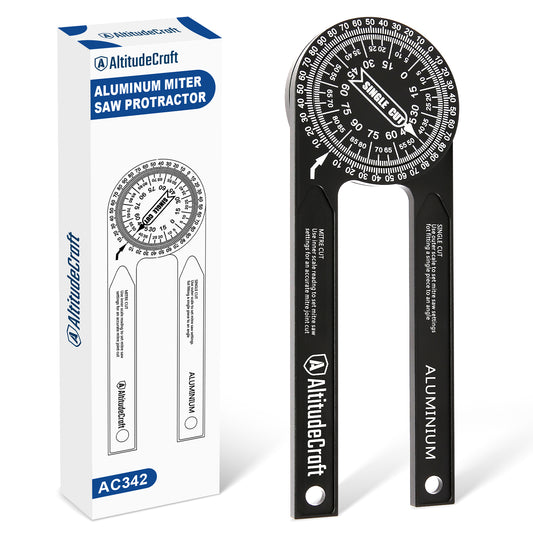
A miter saw protractor measures the actual angle where two surfaces meet — typically a wall corner — and gives you the exact number you need to set your miter saw for a tight-fitting joint. The critical step most beginners miss is that you must divide the measured corner angle by two to get the correct miter saw setting, because the saw cuts from both pieces equally to form the joint. For example, a 90-degree corner requires a 45-degree miter setting, and a 135-degree corner requires a 22.5-degree setting. Most residential wall corners are not perfectly square — they typically range from 87 to 93 degrees — so assuming 90 degrees on every cut guarantees visible gaps. The AltitudeCraft Precision Aluminum Miter Saw Protractor reads angles to within 0.5 degrees on a permanent laser-etched scale, which eliminates the guesswork that causes gaps in trim, baseboard, and crown molding joints on every project.
Every trim carpentry project starts with measuring the angle where two surfaces meet. Walls that look square rarely are. A corner that appears to be 90 degrees might actually be 87 or 93 degrees, and that 3-degree error produces a visible gap in your baseboard or crown molding joint. A miter saw protractor solves this problem by giving you the exact angle measurement before you make any cuts.
This guide covers everything you need to know about miter saw protractors: how they work, how to read and transfer angle measurements to your saw, common residential angles and their corresponding miter settings, the differences between digital and analog protractors, and the mistakes that cause even experienced carpenters to waste material on bad joints.


The tool for this job
AltitudeCraft Precision Aluminum Miter Saw Protractor
$20.99
Free shipping & free returns on US orders $25+
View productWhat Does a Miter Saw Protractor Actually Measure?
A miter saw protractor measures the included angle between two surfaces. In home construction, this is almost always the angle where two walls meet at a corner — either an inside corner (like where two walls come together in a room) or an outside corner (like at a column or bump-out).
The protractor has two arms that pivot from a central point. You place one arm flat against each wall surface, and the scale shows the angle between them. This is the corner angle, also called the included angle. In a perfectly square room, every inside corner measures exactly 90 degrees. In reality, most corners fall between 87 and 93 degrees. Older homes with settling foundations or homes with non-rectangular room layouts — bay windows, angled hallways, octagonal rooms — can have corners anywhere from 45 to 170 degrees.
Understanding what the protractor measures is critical because the number on the protractor is not the number you set on your miter saw. The protractor reads the full corner angle; the miter saw needs half that angle. This distinction causes more wasted material than any other mistake in trim carpentry.
How to Transfer Protractor Readings to Miter Saw Settings
The relationship between the measured corner angle and the miter saw setting depends on whether you are making a miter cut (horizontal angle) or a bevel cut (vertical angle). For standard flat trim like baseboard, casing, and chair rail, you will use miter cuts almost exclusively.
The Divide-by-Two Rule for Miter Cuts
For any inside corner, divide the measured angle by two. That is your miter saw setting. The saw cuts each of the two meeting pieces at this angle, and together they form the full corner angle.
- 90-degree corner → 90 ÷ 2 = 45-degree miter setting
- 88-degree corner → 88 ÷ 2 = 44-degree miter setting
- 135-degree corner → 135 ÷ 2 = 67.5-degree miter setting (common in bay windows)
- 120-degree corner → 120 ÷ 2 = 60-degree miter setting
Most miter saws display the angle as a deviation from 90 degrees (a straight cut). So a "45-degree miter" on the saw is actually labeled as 45 degrees on the detent, representing a 45-degree tilt from the perpendicular fence. Some saws have a secondary scale that shows the complementary angle. Always verify which scale your saw uses before cutting finish material.
Bevel Cuts and Compound Angles
For trim that sits at an angle to the wall — primarily crown molding — you need to calculate both a miter angle and a bevel angle. The process is more complex and depends on the molding's spring angle (typically 38/52 or 45/45). Crown molding compound angle charts from Starrett's angle measurement reference library are invaluable for these calculations. However, if you use dedicated crown stops that hold the molding at its spring angle, you can avoid bevel cuts entirely and use only simple miter cuts.
Outside Corner Calculations
For outside corners, the calculation changes. Measure the outside angle with your protractor, then use this formula: miter setting = (180 − measured angle) ÷ 2. For a standard 90-degree outside corner (which reads as 270 degrees on the full rotation, or equivalently 90 degrees on the outside), the miter setting is (180 − 90) ÷ 2 = 45 degrees. The miter direction reverses compared to inside corners — left becomes right and vice versa.
Common Residential Angles and Miter Settings
The following table covers the most frequently encountered angles in residential construction. Having this reference taped to your miter saw stand saves time on every project. These values assume standard miter cuts for flat trim (baseboard, casing, chair rail).
| Corner Type | Measured Angle | Miter Saw Setting | Where You Find It |
|---|---|---|---|
| Standard inside corner | 90° | 45° | Most room corners |
| Slightly out-of-square inside | 87°–93° | 43.5°–46.5° | Older homes, settling |
| Bay window inside | 135° | 67.5° | 3-panel bay windows |
| Octagonal room | 135° | 67.5° | Turret rooms, gazebos |
| 45-degree angled wall | 135° | 67.5° | Angled hallway transitions |
| Standard outside corner | 90° (outside) | 45° | Column wraps, bump-outs |
| 120-degree angle | 120° | 60° | Hexagonal structures |
Digital vs. Analog Miter Saw Protractors
Miter saw protractors come in two fundamental categories: analog (mechanical) and digital (electronic). Each has clear advantages depending on your workflow and the precision you need.
Analog Protractors
Analog miter saw protractors use a graduated scale — either printed, engraved, or laser-etched — to display the angle. The best analog models, like the AltitudeCraft Precision Aluminum Miter Saw Protractor, use laser-etched markings on machined aluminum arms that will not wear off with use. They have no batteries, no electronic components to fail, and work in any temperature or moisture condition.
The accuracy of an analog protractor depends on the quality of the scale markings and the tightness of the pivot. Cheap plastic protractors with printed scales can drift 2-3 degrees as the pivot loosens over time. Machined aluminum protractors with a steel pivot bolt maintain their accuracy indefinitely because the joint tension is adjustable. The AltitudeCraft protractor reads to 0.5-degree increments, which is sufficient for all residential and most commercial trim work.
Digital Protractors
Digital angle finders use an electronic sensor and an LCD screen to display the angle numerically. They typically read to 0.1-degree precision, which sounds impressive but exceeds what a miter saw can reliably reproduce. Most miter saws have detent accuracy of ±0.5 degrees at preset stops and ±1 degree at non-detent angles.
The advantage of digital is readability — no squinting at fine graduation marks. The disadvantages include battery dependency (they always die on the job site), sensitivity to temperature extremes, and higher cost. Most digital angle finders use CR2032 coin cell batteries with a lifespan of 2,000-3,000 hours, but leaving them on accidentally drains the battery quickly.
Which Should You Choose?
For dedicated trim carpenters who work daily, an analog aluminum protractor is the better long-term tool. It works every time you pick it up. For occasional users or those who struggle to read fine scale markings, a digital model offers convenience. Many professionals carry both — digital for quick checks and analog as the reliable backup according to Fine Homebuilding's trim carpentry project guides.
Step-by-Step: Measuring and Cutting a Perfect Baseboard Joint
This walkthrough uses a miter saw protractor to produce a gap-free baseboard joint at an out-of-square inside corner — the most common scenario where a protractor saves you from wasted material.
Step 1: Measure the Corner Angle
Open your protractor and place one arm flat against each wall. Press both arms firmly — any gap between the arm and the wall surface introduces error. Read the angle where the scale aligns with the pointer. For this example, assume the reading is 88 degrees.
Step 2: Calculate the Miter Setting
Divide the measured angle by two: 88 ÷ 2 = 44 degrees. This is your miter saw setting for both the left and right pieces of baseboard.
Step 3: Set the Miter Saw
Unlock the miter detent and swing the blade to 44 degrees. If your saw has a fine-adjustment knob, use it to dial in the exact angle. Lock the detent firmly before cutting. A saw that shifts during the cut will produce an angled gap at the joint.
Step 4: Cut Both Pieces
Cut the left piece with the miter angled to the left, and the right piece with the miter angled to the right. Hold the baseboard firmly against the fence and table — do not let it lift or shift during the cut.
Step 5: Dry-Fit the Joint
Press both pieces into the corner and check the joint. If the front of the joint is tight but the back is open, the miter angle is too steep (reduce it by 0.5 degrees). If the back is tight but the front is open, the angle is too shallow (increase by 0.5 degrees). This adjustment process is why accurate protractor readings matter — starting at the correct angle means you need zero or one adjustment instead of three or four.
Common Mistakes When Using a Miter Saw Protractor
Even with a quality protractor, these errors cause bad joints:
- Not pressing both arms flat against the walls. A 1/16-inch gap between the protractor arm and the wall can introduce 1-2 degrees of error. Always check that both arms make full contact.
- Measuring at the wrong height. Walls can bow, especially in older homes. Measure at the same height where the trim will be installed — floor level for baseboard, ceiling level for crown.
- Forgetting to divide by two. Setting the saw to the full corner angle instead of half is the most common beginner mistake. A 90-degree corner needs a 45-degree miter setting, not a 90-degree setting.
- Using a loose protractor. If the pivot is loose and the arms flop freely, the reading changes between the wall and the saw. Tighten the pivot until the arms hold their position with moderate friction when moved.
- Assuming all corners are the same. Measure every single corner independently. In a typical room, all four corners can have different angles. Cutting all baseboards to a single angle guarantees at least two bad joints.
Why Material Matters: Aluminum vs. Plastic Protractors
Protractors come in three primary materials: plastic, stainless steel, and aluminum. The material affects accuracy, durability, and usability in meaningful ways.
Plastic protractors are inexpensive ($5-$15) but flex under pressure, which distorts the reading. The printed scale wears off with use, and the pivot loosens over months, making the arms floppy. They are adequate for a single project but will not last through a second one.
Stainless steel protractors are durable but heavy. The weight makes them awkward to hold overhead when measuring ceiling angles. They also tend to scratch finished surfaces.
Aluminum protractors offer the best balance. The AltitudeCraft Precision Aluminum Miter Saw Protractor is machined from 6061-T6 aluminum — the same alloy used in aerospace components — which provides rigidity without excessive weight. The laser-etched scale is permanently marked into the metal surface, so it cannot wear, fade, or peel. The pivot uses a steel bolt with a locking wing nut that maintains consistent friction over years of use.
Frequently Asked Questions
What is the difference between a protractor and an angle finder?
In practice, the terms are interchangeable for miter saw work. Both measure the angle between two surfaces. Some manufacturers use "angle finder" for digital models and "protractor" for analog models, but the function is identical. The critical spec is accuracy — look for ±0.5 degrees or better regardless of what the tool is called.
Can I use a speed square instead of a miter saw protractor?
A speed square can measure angles, but only against one surface at a time. A miter saw protractor places both arms simultaneously against both surfaces of a corner, giving a direct reading of the included angle. Using a speed square requires additional math and introduces more opportunities for error. For anything beyond basic 90-degree and 45-degree cuts, a dedicated protractor is significantly faster and more accurate.
How often should I check my protractor for accuracy?
Test your protractor against a known 90-degree reference (like a machinist's square) every time you start a new project. If the reading is off by more than 0.5 degrees, adjust the pivot tension or replace the tool. Aluminum protractors with steel pivots rarely need calibration, but checking takes ten seconds and prevents an entire project of bad joints.
Why are my miter joints still gapped even with accurate angle measurements?
The protractor reading is only one variable. Other causes of gapped joints include a miter saw that is not properly calibrated (blade not perpendicular to the fence), a dull blade that deflects during the cut, material that is not held firmly against the fence, or baseboard that is bowed or twisted. Always verify your saw is square before blaming the angle measurement.
Do professional carpenters use miter saw protractors?
Yes. Professional trim carpenters measure every corner with a protractor, especially in older homes where settling causes irregular angles. The tool pays for itself on the first project by eliminating wasted material from trial-and-error cuts. Most professionals prefer aluminum analog models for reliability and carry a digital backup for complex layouts.
Get Perfect Angles on Every Cut
A miter saw protractor is the simplest tool upgrade that produces the biggest improvement in trim carpentry quality. Measuring the actual corner angle — instead of assuming every corner is 90 degrees — eliminates the trial-and-error cutting that wastes material and time. The AltitudeCraft Precision Aluminum Miter Saw Protractor gives you accurate, repeatable readings that transfer directly to tight-fitting joints on baseboard, casing, crown molding, and any other angled trim work.
→ Shop the AltitudeCraft Precision Aluminum Miter Saw Protractor
Disclosure: AltitudeCraft is the manufacturer of the protractor featured in this article. All angle measurements and specifications are based on actual product testing. We recommend independent verification for critical applications. External links are provided for reference and do not constitute endorsement by the linked organizations.
Last updated: April 2026
Related reading: AltitudeCraft Insights Blog · Browse All Products · Crown Molding Cutting Guide · Best Miter Saw Protractors Compared · Miter Saw Angle Chart
Featured in this guide
AltitudeCraft Precision Aluminum Miter Saw Protractor
$20.99
Free shipping & free returns on US orders $25+
View productRelated Articles
 Strut Spreader Tool Complete Guide: DIY Suspension Work Made Easy (2026)
Apr 02, 2026
Strut Spreader Tool Complete Guide: DIY Suspension Work Made Easy (2026)
Apr 02, 2026
 Thread Checker Complete Guide: Identify Any Bolt Size in Seconds (2026)
Apr 02, 2026
Thread Checker Complete Guide: Identify Any Bolt Size in Seconds (2026)
Apr 02, 2026
 Sight Pusher Tool Complete Guide: How to Install Glock Sights Like a Pro (2026)
Apr 02, 2026
Sight Pusher Tool Complete Guide: How to Install Glock Sights Like a Pro (2026)
Apr 02, 2026
 Miter Cuts Dont Match the Wall Angle How a Protractor Solves It (2026)
Apr 02, 2026
Miter Cuts Dont Match the Wall Angle How a Protractor Solves It (2026)
Apr 02, 2026
