




How to Tram a CNC Router Spindle: The 180° Dual-Indicator Method and Shim Math (2026)
Last updated: October 2026 | By AltitudeCraft Team
To tram a CNC router, you make the spindle axis perpendicular to the plane the machine travels in. You measure the lean with dial indicators swung around the spindle, then shim or shift the Z mount until the readings match. The measuring is the easy part. Most failed tram jobs go wrong before the first reading: a reference plate that is not parallel to the travel plane, a gantry that twists, or two dial indicators that were never zeroed correctly. This guide covers the checks that make tram readings trustworthy, the 180° method that keeps dial-to-dial differences out of the result, and the shim math, with worked examples.
Disclosure: AltitudeCraft makes the dual-indicator tramming tool shown in this guide. The most common complaint in its returns is not breakage but gauges that "won't align," and that is why this guide spends so long on the measuring process.
Key Takeaway
Tramming a CNC router makes the spindle perpendicular to the machine's X-Y plane of travel, not merely to the wasteboard. Start with a flat reference, such as a granite plate, plate glass or a freshly surfaced spoilboard. Make it parallel to the travel plane by jogging a non-rotating indicator across it and shimming until the reading stays constant. Check collet runout and gantry twist first, because both add error to the readings. With a two-indicator tram bar, zero both dials, then turn the spindle 180° by hand. Each dial lands where the other started and reads the full height difference across the span. The two dials are never compared with each other. To size a shim, multiply that reading by the distance between the mount's fastening points and divide by the indicator span. One forum target for router work is under 0.001 in. over 10 in.; about 0.002 in. corner to corner is commonly accepted for wood.

The tool for this job
AltitudeCraft Precise Mill and Lathe Tramming Tool
$105.99
Free shipping & free returns on US orders $25+
View productWhat does tramming a CNC router fix?
Tramming fixes lean you can see in the cut: ridges between surfacing passes and parts that do not line up after you flip them. If the spindle leans, a wide flat-bottom bit cuts deeper on one side of its path. Surfacing then leaves a sawtooth pattern, with a small lip between passes. The error also multiplies in two-sided work. One machinist calculated that a Z axis off by 0.002 in. per inch leaves the second side of 5 in. stock out of registration by 0.010 in. (reader comment on Corbin Dunn's tramming guide).
There are two directions to correct. Nod is front-to-back lean along Y. Tilt, sometimes called yaw, is left-to-right lean along X. The adjustment points depend on the machine. Shapeoko owners shim behind the Z assembly for nod and tap the motor mount for tilt. Onefinity owners adjust nod at both ends of the X carriage. Avid machines use eccentric bolts. Check your machine's manual for its own adjustment points.

What should you check before you tram a CNC router?
Check the frame, the gantry, the reference surface and the collet before trusting any tram reading. A dial indicator reports every error between its tip and the spindle. One Avid forum member put it bluntly: "you probably have too much and too many inaccuracies built into your process to tell you much" (Avid CNC forum).
| Check | Why it matters | How to do it |
|---|---|---|
| Frame and table | A rocking stand changes the tram every time the machine moves | All four legs on the floor, top level and solid; tighten frame bolts first |
| Gantry twist and Z travel | If Z does not move straight down, a trammed spindle still cuts out of square | Check nod at both ends of the gantry; a reading that changes along X points to twist |
| Reference surface | Tramming to an uneven or tilted surface measures the surface, not the spindle | Clamp an indicator to the non-rotating Z carriage, jog to three corners of a granite plate or glass, and shim the plate until all three read the same |
| Collet runout | A dirty or worn collet tilts whatever it holds | Clean the collet and nut, then indicate a gauge pin; one Onefinity user treats 0.001 in. or less as acceptable, and a very good collet shows about 0.0001 in. at 4× diameter |
Common mistake: tramming to the wasteboard as it sits. One Onefinity user warns against "tramming to a not so coplanar/flat waste board" (Onefinity forum). Vacuum hold-down can also bend a spoilboard 0.001 to 0.003 in. (Industrial Monitor Direct).
How much clearance does a tramming tool need on a desktop CNC?
Measure the space under your collet nut before you buy any tram bar, because the tool has to fit there and turn a half circle. One of our returns reads, "Doesn't fit under the gantry of ttc450 pro." Desktop machines list Z travel, but few list the gap between the collet nut and the bed with Z fully raised. That gap is the number that decides fit.
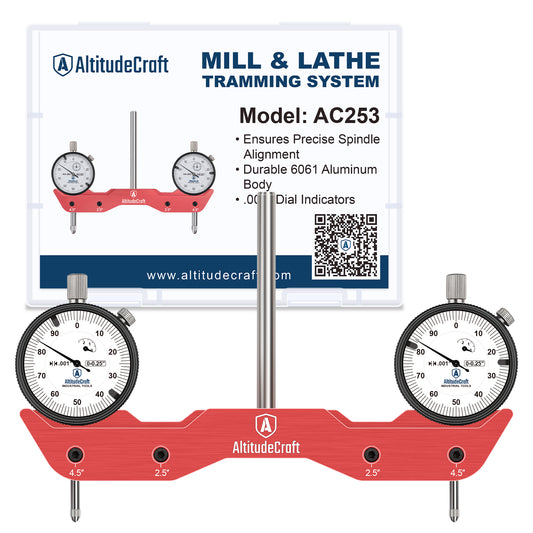
Our tool stands 3.22 in. from the indicator tips to the top of the dials, and the bar is 6.06 in. wide. To use it you need:
- Vertical room: at least 3.22 in. between the collet nut and the reference surface, plus enough shank to grip securely. Add the thickness of a plate if you use one.
- Swing room: a clear circle about 6.06 in. across around the spindle. Common mistake: leaving the dust shoe on, or a clamp standing in the swing path.
- Collet size: a 1/4 in. collet for its 1/4 in. shank.
If you do not have that room, a single indicator on a short sweep arm is the fallback. It is slower but fits under a lower gantry.

How do you tram a CNC router spindle with two dial indicators?
Zero both dials at one position, turn the spindle 180° by hand, and read the lean directly off either dial. After the turn, each dial sits where the other one started. It reports the height difference across the full span, measured against its own zero. The two dials are never compared with each other, so it does not matter that they read differently at first. This is a variant of the dual-indicator procedure described by Industrial Monitor Direct.
- Power down and remove the dust shoe. You turn the spindle by hand. Never run it with a tram bar in the collet.
- Set the span. Use the widest span your clearance allows, because a wider span shows more of the same lean. On our tool the outer holes put the tips 4.5 in. apart and the inner holes 2.5 in. apart.
- Clamp the shank in the collet and tighten the nut as you would for a bit.
- Lower Z until both tips touch the leveled reference with each dial pushed in a little, enough to read in both directions. Our dials have 0.25 in. of travel. Lock Z.
- Point the bar along the axis you are checking, for example left to right for tilt. Turn each bezel to zero.
- Turn the spindle 180° by hand. If a tip catches, press its plunger up slightly while turning. Do not jog any axis.
- Read both dials. If the spindle is square in that direction, both still read zero. If not, one reads about +X and the other about −X. Use X, one dial's reading, in the shim formula. The difference between the dials is 2X and would double the shim.
- Correct, then repeat for the other axis with the bar turned 90°. Make a small correction first and measure again. If the number grows, you went the wrong way.
- Tighten every fastener and measure once more. One Shapeoko owner found that tightening mount bolts moved the reading, which left him "chasing 0" (Carbide 3D Community). The final reading is the one taken with everything tight.
If the two dials are not roughly equal and opposite after the turn, something moved between readings. That mismatch is itself a diagnosis, covered after the shim math.

How do you calculate CNC tramming shim thickness?
Shim thickness equals the distance between the mount's fastening points, times the lean you read, divided by the indicator span. The lean is a slope: you read it across the span and correct it across the mount. One Carbide 3D forum member gives this example. A 9 in. Z mount, a 0.005 in. difference and indicators 3 in. apart give 9 × 0.005 ÷ 3 = 0.015 in. He also places half that thickness at the midpoint so the plate does not bow (Carbide 3D Community).
| Mount fastening distance | Indicator span | Lean read on one dial | Shim at one end |
|---|---|---|---|
| 9 in. | 3 in. | 0.005 in. | 0.015 in. (forum example) |
| 6 in. | 4.5 in. | 0.003 in. | 0.004 in. |
| 6 in. | 2.5 in. | 0.003 in. | 0.0072 in. |
| 4 in. | 4.5 in. | 0.0015 in. | 0.0013 in. |
Where the shim goes depends on how your Z plate mounts. On machines where it bolts to the front face of the gantry, a shim behind the top of the plate pushes the top forward and swings the bit tip back. Real shim stock is easier to control than foil. Corbin Dunn notes that foil tape "doesn't allow precisely shimming as well as actual machinist shims." Still, one Onefinity user reports that folded aluminum foil behind the Z slider has held for months. For left-to-right tilt, most hobby machines have no shim point. One Shapeoko owner loosens three of the four mount screws and taps the mount until the dial shows about half the error, then tightens and measures again.

Why won't the two dial indicators on a tram bar agree?
Two dial indicators rarely read the same out of the box, and that is normal. One tram system manual notes that no two dial indicators are identical. The 180° method never compares them with each other for exactly that reason. Three of our recent returns came from buyers who hit this wall: "Very low quality gauges making it unreliable," "Too much flex in the main shaft," and "Cannot get the gauges to line up correctly upon installation. They won't align. Never used." A return note cannot tell us whether a gauge was faulty. Some may have been, so contact the seller if a dial sticks. But each symptom also has a process cause you can check in minutes.
| Symptom | Likely cause | What to do |
|---|---|---|
| Dials show different numbers at the first position | Normal dial-to-dial variation and unequal preload | Zero both bezels, then use the 180° turn; never compare the raw numbers |
| After 180°, readings are not equal and opposite | Reference not flat, or a tip crossed a seam or dirt | Clean the surface, use a plate or glass, repeat in the same place |
| Repeat readings at one position change | Sticky dial, loose collet, or Z not locked | Push each plunger and watch it return; retighten the collet; lock Z |
| Shaft feels springy and readings drift | Too much preload, or too little shank in the collet | Back off preload; grip more shank |
| Tram is right at one end of X and wrong at the other | Gantry twist or rail error | Fix the gantry first; check nod at both ends |
| Tram is good at rest but the cut shows a lip | Mount flexing under cutting load | Stiffen the mount, take lighter passes, check mount bolts |
Runout belongs here too. One Avid user measured 0.001 to 0.002 in. of runout at the collet and 0.010 to 0.015 in. on a rod 12 in. away. Clean the collet before you blame the indicators.
How accurate does a CNC router tram need to be?
For most router work, aim for under 0.001 in. of change across the sweep. For woodworking, about 0.002 in. corner to corner is commonly accepted. Published targets depend on the size of the sweep, so only compare numbers measured the same way.
| Target | Measured over | Source |
|---|---|---|
| 0.0008 in. (0.0005 in. ideal) | 8 in. circle | Industrial Monitor Direct knowledge base |
| Under 0.001 in. | 10 in. | Carbide 3D Community member |
| About 0.002 in. | Corner to corner, wood routing | Industrial Monitor Direct knowledge base |
| 0.001 in. indicator resolution | Any | Corbin Dunn: 0.0001 in. "probably isn't necessary for wood working" |
The same lean reads 1.8 times larger across a 4.5 in. span as across 2.5 in. If you change tools or spans, convert readings to a slope, such as inches per inch, before comparing.

Single indicator, dual-indicator bar, or a dedicated tram system?
All three are used for router tramming. They differ in setup time and in what they need from your machine.
| Method | What you need | Strengths | Weak points |
|---|---|---|---|
| Single indicator on a sweep arm | Any 0.001 in. dial, arm or magnetic base, leveled reference | Cheap; fits low gantries | Slow; easy to lose track of readings |
| Dual-indicator tram bar (like ours) | Collet for the shank, room to turn the bar, leveled reference | Reads both sides at once; 180° method keeps dial mismatch out | Needs height and swing clearance; dials must be zeroed correctly |
| Dedicated system (for example, Edge Mini Pro Tram) | Matching shank; higher budget | Purpose-built; one listing claims 0.0002 in. indicator repeatability (vendor claim) | Costs more; still needs a flat reference and clearance |
We found no independent test showing that one method is more accurate than the others when each is done well.

Frequently Asked Questions
How often should I tram my CNC router?
Tram after installing or remounting a spindle, after a crash, and whenever surfacing passes start leaving ridges. If the tram drifts within days, look for loose mount bolts or an unstable frame rather than tramming more often.
Should I surface the spoilboard before or after tramming?
After. Tram to a granite plate or glass that you have shimmed parallel to the travel plane, then surface the spoilboard so it matches the trammed spindle. If you surface first, the spoilboard copies the spindle's lean.
Can I tram a CNC router without a dial indicator?
Roughly. Surface with a wide bit, feel for ridges between passes, and adjust until they disappear. That works for rough woodworking but gives no numbers. A 0.001 in. dial indicator gets there faster and tells you when to stop.
What is the difference between nod and tilt?
Nod is front-to-back lean along the Y axis. Tilt, or yaw, is left-to-right lean along the X axis. Measure and correct them separately by turning the tram bar 90° between checks.
Does tramming fix a twisted gantry?
No. Tramming squares the spindle at one spot. If the reading changes as you move along X, the gantry or rails are out. Fix that first, or you are tramming to a moving target.
Will a tramming tool fit under my machine's gantry?
Measure the gap from the collet nut to the bed with Z fully raised, and the clear circle around the spindle. Our tool needs at least 3.22 in. of height plus shank engagement, and about 6.06 in. of swing room.
Related guides
- How to Center Work in a 4-Jaw Chuck With a Dial Indicator
- CNC Drag Knife Shank Sizes: Will 1/4", 3/8", or 1/2" Fit Your Machine?
- Drag Knife vs Oscillating Knife vs Tangential Knife
- Table Saw Alignment: How to Check Blade-to-Slot Parallelism
- Lathe Tool Post Indicator Holder
The bottom line
A good tram starts before the first reading. You need a stable frame, a straight gantry, a reference leveled to the travel plane and a clean collet. Zero both dials, turn the spindle 180°, and read the lean from one dial; the two dials never need to match each other. Convert the reading to a shim with distance × lean ÷ span, tighten everything, and measure again. If your machine has at least 3.22 in. under the collet nut and about 6 in. of swing room, our dual-indicator mill and lathe tramming tool reads both sides in one sweep. If it does not, a single indicator on a short arm will get you there more slowly.
Featured in this guide
AltitudeCraft Precise Mill and Lathe Tramming Tool
$105.99
Free shipping & free returns on US orders $25+
View productRelated Articles
 Drag Knife vs Oscillating Knife vs Tangential Knife: Which CNC Knife Fits Your Material? (2026)
Oct 17, 2026
Drag Knife vs Oscillating Knife vs Tangential Knife: Which CNC Knife Fits Your Material? (2026)
Oct 17, 2026
 CNC Drag Knife Shank Sizes: Will 1/4", 3/8", or 1/2" Fit Your CNC?
Aug 03, 2026
CNC Drag Knife Shank Sizes: Will 1/4", 3/8", or 1/2" Fit Your CNC?
Aug 03, 2026
 How to Adjust Glock Sights: Which Way to Push the Rear Sight and How Far (2026)
Oct 27, 2026
How to Adjust Glock Sights: Which Way to Push the Rear Sight and How Far (2026)
Oct 27, 2026
 The 5 Cut Method: Square a Crosscut Sled (Formula + Worked Example)
Oct 26, 2026
The 5 Cut Method: Square a Crosscut Sled (Formula + Worked Example)
Oct 26, 2026
